
Applies to: I71EQ I71EE I71ER I71EH I51EP I51EW I51EQ I51HR I91FW I91WD I91FX I51HS I91EH
Format:
rtsp://<username>:<password>@<ip>:<port>/<channel>/<stream>
user name: admin (default).
password: password is the camera's admin password.
IP: the camera's IP address.
*Please try the following ways to find the camera's IP address and activate its admin password.
1.In this case, you need to download a SearchConfig Tool on your computer first.
Windows:
Search Tool on Windows Computer(V3.0.4T):
http://www.sanncegroup.com/document/Computer%20software/SearchConfig%20Tool%20V3.0.4.exe
MAC:
Search Tool on MAC Computer(V3.0.4T):
http://www.sanncegroup.com/document/Computer%20software/SearchConfig%20Tool%20Mac%20V3.0.4.dmg
2.Please connect this camera to a PoE switch by an Ethernet cable.
Then make sure your computer and PoE switch are connected to the same network.
Open the SearchConfig Tool to search your camera's IP on the LAN and double-click the IP:

3.Then it will open in the browser and please set up the camera's admin password:
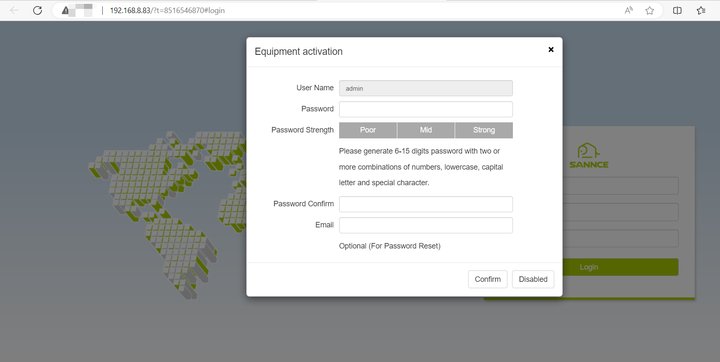
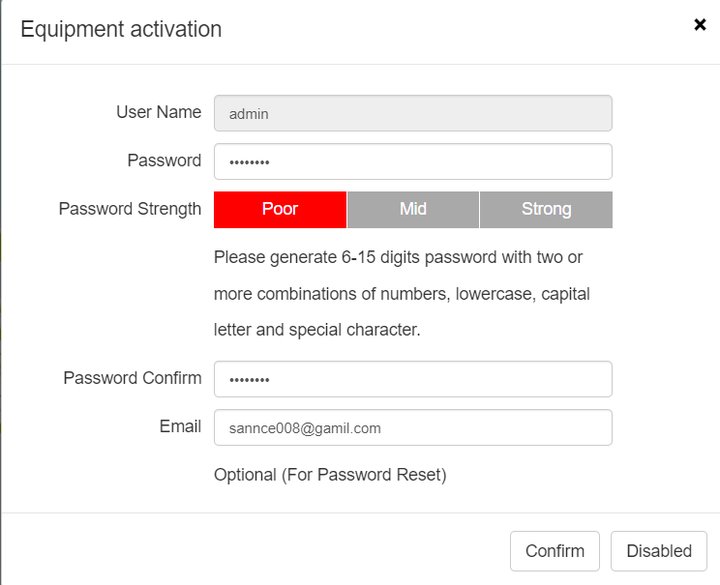
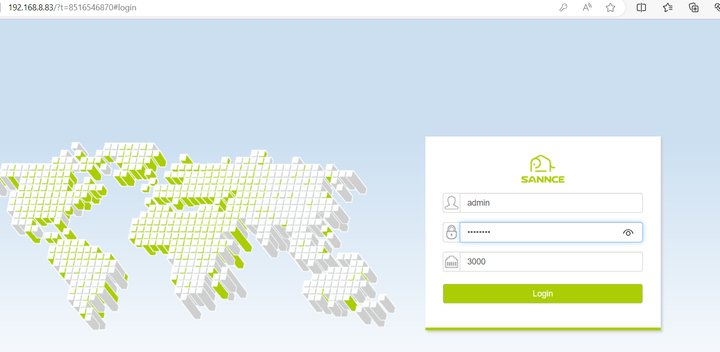
4. Log in by your admin password and verify if it works:
port: 554
channel: CH1
subtype: main stream is 1, sub stream is 2, triple stream is 3.
*Fox example:
rtsp://admin:admin@192.168.1.3:554/1/1
Steps:
1. Please connect the camera to the same router as the computer.
2. Please confirm your camera ip address.
3. Please install VLC player on the computer.
VLC download link: http://support.annke.com/document/download/vlc-2-2-6-win32.exe
4. Please open the VLC player-Media-Open Network Stream and then input the RTSP URL.
rtsp://admin:admin@192.168.1.3:554/1/1
If you have any other questions, please send an email to support@sannce.com for help.


Comments
0 comments
Please sign in to leave a comment.